List Players at Market Price in One Click
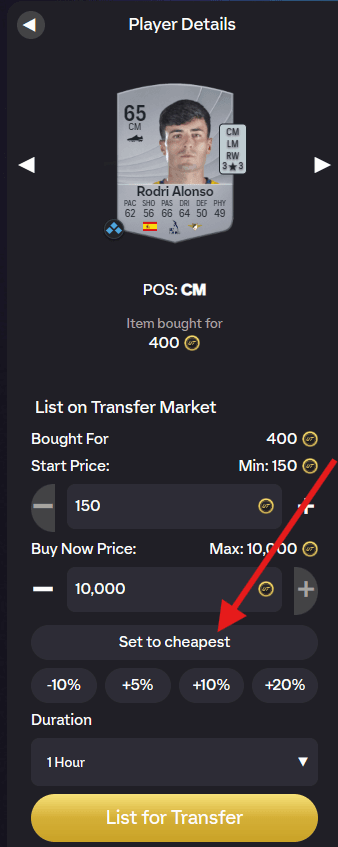
When you list an item on the EA FC 27 transfer market, FUTGenie adds a row of pricing helpers to EA's listing panel, just above the duration picker. No more alt-tabbing to check prices or doing tax maths in your head.
Set to cheapest
Set to cheapest sets your Buy Now to the cheapest listing currently on the market. One tap and you're matching the market. From there, the other buttons let you nudge it.
The percent buttons
Below it are four quick adjusters: -10%, +5%, +10% and +20%. They move your price relative to the reference price, so you can undercut with -10% to sell fast, or lazy list at +10% or +20% and wait for the market to come to you.
Break even
When FUTGenie knows what you paid for the item, a Break even button appears. It prices the listing so that after EA's 5% tax you recoup exactly what you paid. Handy when a flip went sideways and you just want your coins back. If there's no purchase price on record, the button isn't useful and you'll see No last sale price available.
Max profit after tax
Right under EA's Bought For row, FUTGenie adds a live Max profit after tax readout. It takes your Buy Now price, knocks off EA's 5% tax, subtracts what you paid, and updates as you type. Positive numbers show as +N; if you're about to list at a loss it goes red, so you can't accidentally undercut yourself into negative coins.
TOTW pricing
There's a related setting, Global price for TOTW players, which reuses one saved price for all TOTW cards instead of remembering a price per player. Useful since TOTW fodder at the same rating tends to sell for the same amount. You can toggle it under Transfer Market in FUTGenie's settings, see the settings guide.
Listing lots of items at once instead? Check out List Mode in the transfer list tools guide.